Tuesday, May 10, 2022
adbld.xml fails during upgrade step : Generate a new database context file as follows:
oraupg@TESTDB:/data/tech_st/19c/appsutil/bin$ perl adbldxml.pl
Starting context file generation for db tier..
Using JVM from /data/tech_st/19c/appsutil/jre/bin/java to execute java programs..
APPS Password:
The log file for this adbldxml session is located at:
/data/tech_st/19c/appsutil/log/adbldxml_05101159.log
Could not Connect to the Database : ORA-01034: ORACLE not available
ORA-27101: shared memory realm does not exist
SVR4 Error: 2: No such file or directory
Additional information: 2852
Additional information: 1180227351
Connecting to the CRPPP database instance...
Connection parameters values:
Database server hostname ==> TESTDB.DOMAIN.COM
Database listener port ==> 1571
Database SID ==> CRPPP
Database schema name ==> apps
Could not Connect to the Database : ORA-01034: ORACLE not available
ORA-27101: shared memory realm does not exist
SVR4 Error: 2: No such file or directory
Additional information: 2852
Additional information: 1180227351
AC-40000: Error: Exception - java.sql.SQLRecoverableException: ORA-01034: ORACLE not available
ORA-27101: shared memory realm does not exist
SVR4 Error: 2: No such file or directory
Additional information: 2852
Additional information: 1180227351
occurred while connecting to the database - CRPPP
Could not Connect to the Database with the above parameters, Please answer the Questions below
Enter Hostname of Database server[TESTDB.DOMAIN.COM]:
Enter Port of Database server[1571]:
Enter SID of Database server[CRPPP]:
Could not Connect to the Database : ORA-01034: ORACLE not available
ORA-27101: shared memory realm does not exist
SVR4 Error: 2: No such file or directory
Additional information: 2852
Additional information: 1180227351
Could not Connect to the Database with the above parameters, Please answer the Questions below
Enter Hostname of Database server[TESTDB.DOMAIN.COM]:^C^C
Solution : Add parameter USE_SID_AS_SERVICE_LISTENER=ON in the listner.ora and repalce LISTENER with your listner name, relaod the listner and retry adbldxml.pl


Sunday, March 15, 2020
oracle.sysman.oip.oipc.oipcr.OipcrExecuteRuleException: Unable to execute rule 'CertifiedVersions' from ruleset 'OSChecks'.
ERROR: Failed to configure the target system,
please check the logfile in : /u01/DEV/fs1/inst/apps/hostname/admin/log/clone
Enter the APPS password : Enter the APPS password : Error while executing /u01/DEV/fs1/EBSapps/comn/clone/bin/alter_ebs_logon_trigger.sql
Failed to enable EBS_LOGON trigger
Logifle :
contextFile:/u01/DEV/fs1/
OiiolLogger.addFileHandler:
java.io.FileNotFoundException: /u01/DEV/fs1/EBSapps/comn/
The entry point is: oracle.installType.all
Check Name:CertifiedVersions
Check Description:This is a prerequisite condition to test whether the Oracle software is certified on the current O/S or not.
/etc/inittab does not seem to contain default runlevel information.
oracle.sysman.oip.oipc.oipcr.
at oracle.sysman.oip.oipc.oipcr.
at oracle.sysman.oip.oipc.oipcp.
at oracle.sysman.oip.oipc.oipcp.
at oracle.sysman.oip.oipc.oipcp.
at oracle.as.install.engine.
at oracle.apps.ad.clone.util.
at oracle.apps.ad.clone.util.
Caused by: java.lang.reflect.
at sun.reflect.
at sun.reflect.
at sun.reflect.
at java.lang.reflect.Method.
at oracle.sysman.oip.oipc.oipcr.
... 6 more
Caused by: java.lang.NullPointerException
at oracle.sysman.oip.oipc.oipch.
at oracle.sysman.oip.oipc.oipch.
at oracle.sysman.oip.oipc.oipch.
at oracle.sysman.oip.oipc.oipch.
at oracle.sysman.oip.oipc.oipch.
at oracle.sysman.oip.oipc.oipch.
at oracle.sysman.oip.oipc.oipck.
at oracle.sysman.oip.oipc.oipck.
at oracle.sysman.oip.oipc.oipck.
at oracle.sysman.oip.oipc.oipck.
at oracle.sysman.oip.oipc.oipcr.
at oracle.sysman.oip.oipc.oipcz.
... 11 more
Check complete. The overall result of this check is: Not executed <<<<
please check the logfile in : /u01/DEV/fs1/inst/apps/hostname/admin/log/clone
Enter the APPS password : Enter the APPS password : Error while executing /u01/DEV/fs1/EBSapps/comn/clone/bin/alter_ebs_logon_trigger.sql
Failed to enable EBS_LOGON trigger
Logifle :
contextFile:/u01/DEV/fs1/
OiiolLogger.addFileHandler:
java.io.FileNotFoundException: /u01/DEV/fs1/EBSapps/comn/
The entry point is: oracle.installType.all
Check Name:CertifiedVersions
Check Description:This is a prerequisite condition to test whether the Oracle software is certified on the current O/S or not.
/etc/inittab does not seem to contain default runlevel information.
oracle.sysman.oip.oipc.oipcr.
at oracle.sysman.oip.oipc.oipcr.
at oracle.sysman.oip.oipc.oipcp.
at oracle.sysman.oip.oipc.oipcp.
at oracle.sysman.oip.oipc.oipcp.
at oracle.as.install.engine.
at oracle.apps.ad.clone.util.
at oracle.apps.ad.clone.util.
Caused by: java.lang.reflect.
at sun.reflect.
at sun.reflect.
at sun.reflect.
at java.lang.reflect.Method.
at oracle.sysman.oip.oipc.oipcr.
... 6 more
Caused by: java.lang.NullPointerException
at oracle.sysman.oip.oipc.oipch.
at oracle.sysman.oip.oipc.oipch.
at oracle.sysman.oip.oipc.oipch.
at oracle.sysman.oip.oipc.oipch.
at oracle.sysman.oip.oipc.oipch.
at oracle.sysman.oip.oipc.oipch.
at oracle.sysman.oip.oipc.oipck.
at oracle.sysman.oip.oipc.oipck.
at oracle.sysman.oip.oipc.oipck.
at oracle.sysman.oip.oipc.oipck.
at oracle.sysman.oip.oipc.oipcr.
at oracle.sysman.oip.oipc.oipcz.
... 11 more
Check complete. The overall result of this check is: Not executed <<<<
Solution : Move this file to a new name '/usr/tmp/sysdef.txt' file
mv /usr/tmp/sysdef.txt /usr/tmp/sysdef.txt.bkp
Monday, October 31, 2016
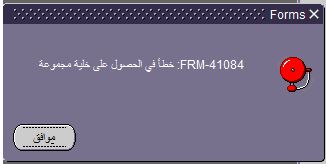
FRM-40733 PL/SQL SET_GROUP_CHAR_CELL , FRM-41084
This week was installing Arabic NLS on 12.2.4 and after the regular steps i faced a strange issue while opening arabic forms they error out in FRM-40733 and FRM-41084 and this happens across the board.


This issue can be solved by applying the below patches, apply them both in base language and arabic.
24839804
20135590
Hope this helps.
Thank you.
This issue can be solved by applying the below patches, apply them both in base language and arabic.
24839804
20135590
Hope this helps.
Thank you.
Tuesday, October 25, 2016
R12 ADOP patch session failing for form / report compilation
Error :
***
Continue as if it were successful :
***
AutoPatch could not find a response to the above prompt
in the defaults file.
While looking at the log file i could see lot of forms that were not compiled, to avoid this situation use restart=yes flags=autoskip in adop
==========================================================
Patch session with error:
appltest@tstsrv:/u25/TEST/fs_ne/EBSapps/patch$ adop phase=apply patches=24944395_AR:u24944395.drv restart=yes prompt=yes
Enter the APPS password:
Enter the SYSTEM password:
Enter the WLSADMIN password:
Validating credentials.
Initializing.
Run Edition context : /u25/TEST/fs2/inst/apps/TEST_tstsrv/appl/admin/TEST_tstsrv.xml
Patch edition context: /u25/TEST/fs1/inst/apps/TEST_tstsrv/appl/admin/TEST_tstsrv.xml
Reading driver file (up to 50000000 bytes).
Patch file system free space: 120.47 GB
Validating system setup.
Node registry is valid.
[WARNING] ETCC: The following required database fixes have not been applied to node tstsrv:
19791273
20588502
20825533
20936905
21091431
21153266
Refer to My Oracle Support Knowledge Document 1594274.1 for instructions.
Checking for existing adop sessions.
Continuing with existing session [Session ID: 28].
Session Id : 28
Prepare phase status : COMPLETED
Apply phase status : ATLEAST ONE PATCH IS ALREADY APPLIED
Cutover phase status : NOT COMPLETED
Abort phase status : NOT COMPLETED
Session status : FAILED
===========================================================================
ADOP (C.Delta.7)
Session ID: 28
Node: tstsrv
Phase: apply
Log: /u25/TEST/fs_ne/EBSapps/log/adop/28/adop_20161025_081029.log
===========================================================================
Applying patch 24944395_AR:u24944395.drv.
Log: /u25/TEST/fs_ne/EBSapps/log/adop/28/apply_20161025_100413/TEST_tstsrv/24944395_AR/log/u24944395.log
***
Continue as if it were successful :
***
AutoPatch could not find a response to the above prompt
in the defaults file.
The patch has FAILED,
Please check the adpatch logs for more details.
You should check the file
/u25/TEST/fs_ne/EBSapps/log/adop/28/apply_20161025_100413/TEST_tstsrv/24944395_AR/log/u24944395.log
for errors.
[UNEXPECTED]Error occurred executing "adpatch abandon=no restart=yes workers=24 console=no interactive=no defaultsfile=/u25/TEST/fs1/EBSapps/appl/admin/TEST_patch/adalldefaults.txt patchtop=/u25/TEST/fs_ne/EBSapps/patch/24944395_AR driver=u24944395.drv logfile=u24944395.log"
[UNEXPECTED]Refer to the log files for more information.
[UNEXPECTED]Apply phase has failed.
[STATEMENT] Please run adopscanlog utility, using the command
"adopscanlog -latest=yes"
to get the list of the log files along with snippet of the error message corresponding to each log file.
adop exiting with status = 1 (Fail)
===================================================================
Patch session post autoskip without erorrs :
applTEST@tstsrv:/u25/TEST/fs_ne/EBSapps/patch$ adop phase=apply patches=24944395_AR:u24944395.drv restart=yes flags=autoskip
Enter the APPS password:
Enter the SYSTEM password:
Enter the WLSADMIN password:
Validating credentials.
Initializing.
Run Edition context : /u25/TEST/fs2/inst/apps/TEST_tstsrv/appl/admin/TEST_tstsrv.xml
Patch edition context: /u25/TEST/fs1/inst/apps/TEST_tstsrv/appl/admin/TEST_tstsrv.xml
Reading driver file (up to 50000000 bytes).
Patch file system free space: 120.47 GB
Validating system setup.
Node registry is valid.
[WARNING] ETCC: The following required database fixes have not been applied to node tstsrv:
19791273
20588502
20825533
20936905
21091431
21153266
Refer to My Oracle Support Knowledge Document 1594274.1 for instructions.
Checking for existing adop sessions.
Continuing with existing session [Session ID: 28].
Session Id : 28
Prepare phase status : COMPLETED
Apply phase status : ATLEAST ONE PATCH IS ALREADY APPLIED
Cutover phase status : NOT COMPLETED
Abort phase status : NOT COMPLETED
Session status : FAILED
===========================================================================
ADOP (C.Delta.7)
Session ID: 28
Node: tstsrv
Phase: apply
Log: /u25/TEST/fs_ne/EBSapps/log/adop/28/adop_20161025_081029.log
===========================================================================
Applying patch 24944395_AR:u24944395.drv.
Log: /u25/TEST/fs_ne/EBSapps/log/adop/28/apply_20161025_100857/TEST_tstsrv/24944395_AR/log/u24944395.log
[WARNING] Some patching actions failed and were skipped
[WARNING] Refer to the autoskip logfile for the list of skipped jobs
[WARNING] Logfile: /u25/TEST/fs_ne/EBSapps/log/adop/28/apply_20161025_100857/TEST_tstsrv/24944395_AR/log/autoskip.log
Generating post apply reports.
Generating log report.
Output: /u25/TEST/fs_ne/EBSapps/log/adop/28/apply_20161025_100857/TEST_tstsrv/adzdshowlog.out
The apply phase completed successfully.
adop exiting with status = 0 (Success)
In addition to the above autoskip option creates a new logfile called asautoskip.log unfortunately it didnt catch any info on the missed file I had to go back to the log and lgi file to trace out the missing files.
applTEST@tstsrv:/u25/TEST/fs_ne/EBSapps/log/adop/28/apply_20161025_100857/TEST_tstsrv/24944395_AR/log$ cat autoskip.log
************* Start of AutoPatch session *************
AutoPatch started at: Tue Oct 25 2016 10:10:01
Autoskipped at Tue Oct 25 2016 10:11:24
[Session : 186984, Error while generating Oracle Forms files]
Autoskipped at Tue Oct 25 2016 10:15:16
[Session : 186984, Error while generating Oracle Reports files]
***
Continue as if it were successful :
***
AutoPatch could not find a response to the above prompt
in the defaults file.
While looking at the log file i could see lot of forms that were not compiled, to avoid this situation use restart=yes flags=autoskip in adop
==========================================================
Patch session with error:
appltest@tstsrv:/u25/TEST/fs_ne/EBSapps/patch$ adop phase=apply patches=24944395_AR:u24944395.drv restart=yes prompt=yes
Enter the APPS password:
Enter the SYSTEM password:
Enter the WLSADMIN password:
Validating credentials.
Initializing.
Run Edition context : /u25/TEST/fs2/inst/apps/TEST_tstsrv/appl/admin/TEST_tstsrv.xml
Patch edition context: /u25/TEST/fs1/inst/apps/TEST_tstsrv/appl/admin/TEST_tstsrv.xml
Reading driver file (up to 50000000 bytes).
Patch file system free space: 120.47 GB
Validating system setup.
Node registry is valid.
[WARNING] ETCC: The following required database fixes have not been applied to node tstsrv:
19791273
20588502
20825533
20936905
21091431
21153266
Refer to My Oracle Support Knowledge Document 1594274.1 for instructions.
Checking for existing adop sessions.
Continuing with existing session [Session ID: 28].
Session Id : 28
Prepare phase status : COMPLETED
Apply phase status : ATLEAST ONE PATCH IS ALREADY APPLIED
Cutover phase status : NOT COMPLETED
Abort phase status : NOT COMPLETED
Session status : FAILED
===========================================================================
ADOP (C.Delta.7)
Session ID: 28
Node: tstsrv
Phase: apply
Log: /u25/TEST/fs_ne/EBSapps/log/adop/28/adop_20161025_081029.log
===========================================================================
Applying patch 24944395_AR:u24944395.drv.
Log: /u25/TEST/fs_ne/EBSapps/log/adop/28/apply_20161025_100413/TEST_tstsrv/24944395_AR/log/u24944395.log
***
Continue as if it were successful :
***
AutoPatch could not find a response to the above prompt
in the defaults file.
The patch has FAILED,
Please check the adpatch logs for more details.
You should check the file
/u25/TEST/fs_ne/EBSapps/log/adop/28/apply_20161025_100413/TEST_tstsrv/24944395_AR/log/u24944395.log
for errors.
[UNEXPECTED]Error occurred executing "adpatch abandon=no restart=yes workers=24 console=no interactive=no defaultsfile=/u25/TEST/fs1/EBSapps/appl/admin/TEST_patch/adalldefaults.txt patchtop=/u25/TEST/fs_ne/EBSapps/patch/24944395_AR driver=u24944395.drv logfile=u24944395.log"
[UNEXPECTED]Refer to the log files for more information.
[UNEXPECTED]Apply phase has failed.
[STATEMENT] Please run adopscanlog utility, using the command
"adopscanlog -latest=yes"
to get the list of the log files along with snippet of the error message corresponding to each log file.
adop exiting with status = 1 (Fail)
===================================================================
Patch session post autoskip without erorrs :
applTEST@tstsrv:/u25/TEST/fs_ne/EBSapps/patch$ adop phase=apply patches=24944395_AR:u24944395.drv restart=yes flags=autoskip
Enter the APPS password:
Enter the SYSTEM password:
Enter the WLSADMIN password:
Validating credentials.
Initializing.
Run Edition context : /u25/TEST/fs2/inst/apps/TEST_tstsrv/appl/admin/TEST_tstsrv.xml
Patch edition context: /u25/TEST/fs1/inst/apps/TEST_tstsrv/appl/admin/TEST_tstsrv.xml
Reading driver file (up to 50000000 bytes).
Patch file system free space: 120.47 GB
Validating system setup.
Node registry is valid.
[WARNING] ETCC: The following required database fixes have not been applied to node tstsrv:
19791273
20588502
20825533
20936905
21091431
21153266
Refer to My Oracle Support Knowledge Document 1594274.1 for instructions.
Checking for existing adop sessions.
Continuing with existing session [Session ID: 28].
Session Id : 28
Prepare phase status : COMPLETED
Apply phase status : ATLEAST ONE PATCH IS ALREADY APPLIED
Cutover phase status : NOT COMPLETED
Abort phase status : NOT COMPLETED
Session status : FAILED
===========================================================================
ADOP (C.Delta.7)
Session ID: 28
Node: tstsrv
Phase: apply
Log: /u25/TEST/fs_ne/EBSapps/log/adop/28/adop_20161025_081029.log
===========================================================================
Applying patch 24944395_AR:u24944395.drv.
Log: /u25/TEST/fs_ne/EBSapps/log/adop/28/apply_20161025_100857/TEST_tstsrv/24944395_AR/log/u24944395.log
[WARNING] Some patching actions failed and were skipped
[WARNING] Refer to the autoskip logfile for the list of skipped jobs
[WARNING] Logfile: /u25/TEST/fs_ne/EBSapps/log/adop/28/apply_20161025_100857/TEST_tstsrv/24944395_AR/log/autoskip.log
Generating post apply reports.
Generating log report.
Output: /u25/TEST/fs_ne/EBSapps/log/adop/28/apply_20161025_100857/TEST_tstsrv/adzdshowlog.out
The apply phase completed successfully.
adop exiting with status = 0 (Success)
In addition to the above autoskip option creates a new logfile called asautoskip.log unfortunately it didnt catch any info on the missed file I had to go back to the log and lgi file to trace out the missing files.
applTEST@tstsrv:/u25/TEST/fs_ne/EBSapps/log/adop/28/apply_20161025_100857/TEST_tstsrv/24944395_AR/log$ cat autoskip.log
************* Start of AutoPatch session *************
AutoPatch started at: Tue Oct 25 2016 10:10:01
Autoskipped at Tue Oct 25 2016 10:11:24
[Session : 186984, Error while generating Oracle Forms files]
Autoskipped at Tue Oct 25 2016 10:15:16
[Session : 186984, Error while generating Oracle Reports files]
Wednesday, September 7, 2016
R12.2 why is my apps tier growing?
Recent observation that RUN file system is growing rapidly, on quick analysis its been found that logs in OHS,forms server and reports cache is not being cleaned and has to be done manually.
Below are the location for the above mentioned points.
Schedule a cronjob to delete old access and error log files from the first 2 location and the last location can be purged as and when required.
Below are the location for the above mentioned points.
Schedule a cronjob to delete old access and error log files from the first 2 location and the last location can be purged as and when required.
- /apps/PROD/fs2/FMW_Home/webtier/instances/EBS_web_PROD_OHS1/diagnostics/logs/OHS/EBS_web_PROD
- /apps/PROD/fs2/FMW_Home/user_projects/domains/EBS_domain_PROD/servers/forms_server1/logs
- /apps/PROD/fs2/inst/apps/PROD_prdsrv/logs/ora/10.1.2/reports/cache
Thank you.
Tuesday, September 6, 2016
Configuring ILOM in Enterprise Manager 13c
How to configure ILOM in EM13c?
Please follow the steps below.
1) From the setup go to add traget --> add targets manually.

2) click on Add using guided process.


Please follow the steps below.
1) From the setup go to add traget --> add targets manually.

2) click on Add using guided process.

3) Select systems infrastructure server ILOM.

4) Give a desired target name, enter the ip address of the ILOM
In monitoring agent URL select the agent that was installed for EM server.
Enter credentails for the ILOM and click on test connection once the connetion is successful click on add.

5) Go to target and look for the platform section and there you should see the configured ILOM.

Thank you.
Uninstalling 12c EM agent
Go to the agent home directory and perform the below steps:
make sure oraInst.loc is pointing to the correct inventory.
/u27/AGENT/core/12.1.0.5.0/perl/bin$ /u27/AGENT/core/12.1.0.5.0/perl/bin/perl /u27/AGENT/core/12.1.0.5.0/sysman/install/AgentDeinstall.pl -agentHome /u27/AGENT/core/12.1.0.5.0
agent@tstsrv:/u27/AGENT/core/12.1.0.5.0/perl/bin$ /u27/AGENT/core/12.1.0.5.0/perl/bin/perl /u27/AGENT/core/12.1.0.5.0/sysman/install/AgentDeinstall.pl -agentHome /u27/AGENT/core/12.1.0.5.0
Agent Oracle Home: /u27/AGENT/core/12.1.0.5.0
agentHome = /u27/AGENT/core/12.1.0.5.0
NOTE: The agent base directory: /u27/AGENT will be removed after successful deinstallation of agent home.
DetachHome Command executed:/u27/AGENT/core/12.1.0.5.0/oui/bin/runInstaller -detachHome -force -depHomesOnly -silent ORACLE_HOME=/u27/AGENT/core/12.1.0.5.0 -waitForCompletion -invPtrLoc /u27/AGENT/core/12.1.0.5.0/oraInst.loc
Starting Oracle Universal Installer...
Checking swap space: must be greater than 500 MB. Actual 39265 MB Passed
The inventory pointer is located at /u27/AGENT/core/12.1.0.5.0/oraInst.loc
'DetachHome' was successful.
Starting Oracle Universal Installer...
Checking swap space: must be greater than 500 MB. Actual 39265 MB Passed
The inventory pointer is located at /u27/AGENT/core/12.1.0.5.0/oraInst.loc
The Oracle home '/u27/AGENT/sbin' could not be updated as it does not exist.
Deinstall Command executed:/u27/AGENT/core/12.1.0.5.0/oui/bin/runInstaller -deinstall -silent "REMOVE_HOMES={/u27/AGENT/core/12.1.0.5.0}" -waitForCompletion -removeAllFiles -invPtrLoc /u27/AGENT/core/12.1.0.5.0/oraInst.loc
Starting Oracle Universal Installer...
Checking swap space: must be greater than 500 MB. Actual 39265 MB Passed
Oracle Universal Installer, Version 11.1.0.13.0 Production
Copyright (C) 1999, 2015, Oracle. All rights reserved.
Starting deinstall
Deinstall in progress (Monday, September 5, 2016 2:13:30 PM AST)
Configuration assistant "Agent Deinstall Assistant" succeeded
............................................................... 100% Done.
Deinstall successful
End of install phases.(Monday, September 5, 2016 2:13:56 PM AST)
End of deinstallations
Please check '/u27/ORACLE/oraInventory/logs/silentInstall2016-09-05_02-13-26PM.log' for more details.
Can't locate Carp.pm in @INC (@INC contains: /u27/AGENT/core/12.1.0.5.0/perl/lib/5.10.0/sun4-solaris-thread-multi-64 /u27/AGENT/core/12.1.0.5.0/perl/lib/5.10.0 /u27/AGENT/core/12.1.0.5.0/perl/lib/site_perl/5.10.0/sun4-solaris-thread-multi-64 /u27/AGENT/core/12.1.0.5.0/perl/lib/site_perl/5.10.0 /u27/AGENT/core/12.1.0.5.0/perl/lib/5.10.0/sun4-solaris-thread-multi-64 /u27/AGENT/core/12.1.0.5.0/perl/lib/5.10.0 /u27/AGENT/core/12.1.0.5.0/perl/lib/5.10.0/sun4-solaris-thread-multi-64 /u27/AGENT/core/12.1.0.5.0/perl/lib/site_perl/5.10.0/sun4-solaris-thread-multi-64 /u27/AGENT/core/12.1.0.5.0/perl/lib/site_perl/5.10.0 /u27/AGENT/core/12.1.0.5.0/perl/lib/site_perl .) at /u27/AGENT/core/12.1.0.5.0/perl/lib/5.10.0/File/Path.pm line 32.
agent@tstsrv:/u27/AGENT/core/12.1.0.5.0/perl/bin$
make sure oraInst.loc is pointing to the correct inventory.
/u27/AGENT/core/12.1.0.5.0/perl/bin$ /u27/AGENT/core/12.1.0.5.0/perl/bin/perl /u27/AGENT/core/12.1.0.5.0/sysman/install/AgentDeinstall.pl -agentHome /u27/AGENT/core/12.1.0.5.0
agent@tstsrv:/u27/AGENT/core/12.1.0.5.0/perl/bin$ /u27/AGENT/core/12.1.0.5.0/perl/bin/perl /u27/AGENT/core/12.1.0.5.0/sysman/install/AgentDeinstall.pl -agentHome /u27/AGENT/core/12.1.0.5.0
Agent Oracle Home: /u27/AGENT/core/12.1.0.5.0
agentHome = /u27/AGENT/core/12.1.0.5.0
NOTE: The agent base directory: /u27/AGENT will be removed after successful deinstallation of agent home.
DetachHome Command executed:/u27/AGENT/core/12.1.0.5.0/oui/bin/runInstaller -detachHome -force -depHomesOnly -silent ORACLE_HOME=/u27/AGENT/core/12.1.0.5.0 -waitForCompletion -invPtrLoc /u27/AGENT/core/12.1.0.5.0/oraInst.loc
Starting Oracle Universal Installer...
Checking swap space: must be greater than 500 MB. Actual 39265 MB Passed
The inventory pointer is located at /u27/AGENT/core/12.1.0.5.0/oraInst.loc
'DetachHome' was successful.
Starting Oracle Universal Installer...
Checking swap space: must be greater than 500 MB. Actual 39265 MB Passed
The inventory pointer is located at /u27/AGENT/core/12.1.0.5.0/oraInst.loc
The Oracle home '/u27/AGENT/sbin' could not be updated as it does not exist.
Deinstall Command executed:/u27/AGENT/core/12.1.0.5.0/oui/bin/runInstaller -deinstall -silent "REMOVE_HOMES={/u27/AGENT/core/12.1.0.5.0}" -waitForCompletion -removeAllFiles -invPtrLoc /u27/AGENT/core/12.1.0.5.0/oraInst.loc
Starting Oracle Universal Installer...
Checking swap space: must be greater than 500 MB. Actual 39265 MB Passed
Oracle Universal Installer, Version 11.1.0.13.0 Production
Copyright (C) 1999, 2015, Oracle. All rights reserved.
Starting deinstall
Deinstall in progress (Monday, September 5, 2016 2:13:30 PM AST)
Configuration assistant "Agent Deinstall Assistant" succeeded
............................................................... 100% Done.
Deinstall successful
End of install phases.(Monday, September 5, 2016 2:13:56 PM AST)
End of deinstallations
Please check '/u27/ORACLE/oraInventory/logs/silentInstall2016-09-05_02-13-26PM.log' for more details.
Can't locate Carp.pm in @INC (@INC contains: /u27/AGENT/core/12.1.0.5.0/perl/lib/5.10.0/sun4-solaris-thread-multi-64 /u27/AGENT/core/12.1.0.5.0/perl/lib/5.10.0 /u27/AGENT/core/12.1.0.5.0/perl/lib/site_perl/5.10.0/sun4-solaris-thread-multi-64 /u27/AGENT/core/12.1.0.5.0/perl/lib/site_perl/5.10.0 /u27/AGENT/core/12.1.0.5.0/perl/lib/5.10.0/sun4-solaris-thread-multi-64 /u27/AGENT/core/12.1.0.5.0/perl/lib/5.10.0 /u27/AGENT/core/12.1.0.5.0/perl/lib/5.10.0/sun4-solaris-thread-multi-64 /u27/AGENT/core/12.1.0.5.0/perl/lib/site_perl/5.10.0/sun4-solaris-thread-multi-64 /u27/AGENT/core/12.1.0.5.0/perl/lib/site_perl/5.10.0 /u27/AGENT/core/12.1.0.5.0/perl/lib/site_perl .) at /u27/AGENT/core/12.1.0.5.0/perl/lib/5.10.0/File/Path.pm line 32.
agent@tstsrv:/u27/AGENT/core/12.1.0.5.0/perl/bin$
Monday, September 5, 2016
The command name "import_update_catalog" is not a recognized command.
While updating catalog in Enterprise manager 13c i was facing below issue:
[applgrid@em13c bin]$ ./emcli import_update_catalog -file=/u01/SOFT/PATCHES/p9348486_112000_Generic.zip -omslocal
Error: The command name "import_update_catalog" is not a recognized command.
Run the "help" command for a list of recognized commands.
You may also need to run the "sync" command to synchronize with the current OMS.
Solution :
[applgrid@em13c bin]$ emcli import_update_catalog -file=/u01/SOFT/PATCHES/p9348486_112000_Generic.zip -omslocal
Error: The command name "import_update_catalog" is not a recognized command.
Run the "help" command for a list of recognized commands.
You may also need to run the "sync" command to synchronize with the current OMS.
[applgrid@em13c bin]$ ./emcli setup -url="https://em13c.domain.com:7802/em" -username=sysman -password=xxxxxx -trustall
Oracle Enterprise Manager 13c Release 1.
Copyright (c) 1996, 2015 Oracle Corporation and/or its affiliates. All rights reserved.
Emcli setup successful
[applgrid@em13c bin]$ ./emcli login -username=sysman
Error: Already logged in as user "sysman". Use "emcli logout" to logout the current user.
[applgrid@em13c bin]$ ./emcli sync
Synchronized successfully
[applgrid@em13c bin]$ emcli import_update_catalog -file=/u01/SOFT/PATCHES/p9348486_112000_Generic.zip -omslocal
Processing catalog for Agent Software
Processing update: Agent Software - Agent Software (12.1.0.5.0) for Microsoft Windows (32-bit)
Processing update: Agent Software - Agent Software (12.1.0.4.0) for Microsoft Windows (32-bit)
Processing update: Agent Software - Agent Software (12.1.0.3.0) for Microsoft Windows (32-bit)
Processing update: Agent Software - Agent Software (12.1.0.2.0) for Microsoft Windows (32-bit)
Processing update: Agent Software - Agent Software (12.1.0.1.0) for Microsoft Windows (32-bit)
Processing update: Agent Software - Agent Software (12.1.0.5.0) for HP-UX PA-RISC (64-bit)
Processing update: Agent Software - Agent Software (12.1.0.4.0) for HP-UX PA-RISC (64-bit)
Processing update: Agent Software - Agent Software (12.1.0.3.0) for HP-UX PA-RISC (64-bit)
Processing update: Agent Software - Agent Software (12.1.0.2.0) for HP-UX PA-RISC (64-bit)
Processing update: Agent Software - Agent Software (12.1.0.1.0) for HP-UX PA-RISC (64-bit)
Processing update: Agent Software - Agent Software (13.1.0.0.0) for Linux x86
Processing update: Agent Software - Agent Software (12.1.0.5.0) for Linux x86
Processing update: Agent Software - Agent Software (12.1.0.4.0) for Linux x86
Processing update: Agent Software - Agent Software (12.1.0.3.0) for Linux x86
Processing update: Agent Software - Agent Software (12.1.0.2.0) for Linux x86
Processing update: Agent Software - Agent Software (12.1.0.1.0) for Linux x86
Processing update: Agent Software - Agent Software (13.1.0.0.0) for Oracle Solaris on x86-64 (64-bit)
Processing update: Agent Software - Agent Software (12.1.0.5.0) for Oracle Solaris on x86-64 (64-bit)
Processing update: Agent Software - Agent Software (12.1.0.4.0) for Oracle Solaris on x86-64 (64-bit)
Processing update: Agent Software - Agent Software (12.1.0.3.0) for Oracle Solaris on x86-64 (64-bit)
Processing update: Agent Software - Agent Software (12.1.0.2.0) for Oracle Solaris on x86-64 (64-bit)
Processing update: Agent Software - Agent Software (12.1.0.1.0) for Oracle Solaris on x86-64 (64-bit)
Processing update: Agent Software - Agent Software (13.1.0.0.0) for Oracle Solaris on SPARC (64-bit)
Processing update: Agent Software - Agent Software (12.1.0.5.0) for Oracle Solaris on SPARC (64-bit)
Processing update: Agent Software - Agent Software (12.1.0.4.0) for Oracle Solaris on SPARC (64-bit)
Processing update: Agent Software - Agent Software (12.1.0.3.0) for Oracle Solaris on SPARC (64-bit)
Processing update: Agent Software - Agent Software (12.1.0.2.0) for Oracle Solaris on SPARC (64-bit)
Processing update: Agent Software - Agent Software (12.1.0.1.0) for Oracle Solaris on SPARC (64-bit)
Processing update: Agent Software - Agent Software (13.1.0.0.0) for Microsoft Windows x64 (64-bit)
Processing update: Agent Software - Agent Software (12.1.0.5.0) for Microsoft Windows x64 (64-bit)
Processing update: Agent Software - Agent Software (12.1.0.4.0) for Microsoft Windows x64 (64-bit)
Processing update: Agent Software - Agent Software (12.1.0.3.0) for Microsoft Windows x64 (64-bit)
Processing update: Agent Software - Agent Software (12.1.0.2.0) for Microsoft Windows x64 (64-bit)
Processing update: Agent Software - Agent Software (12.1.0.1.0) for Microsoft Windows x64 (64-bit)
Processing update: Agent Software - Agent Software (12.1.0.5.0) for Linux x86-64
Processing update: Agent Software - Agent Software (12.1.0.4.0) for Linux x86-64
Processing update: Agent Software - Agent Software (12.1.0.3.0) for Linux x86-64
Processing update: Agent Software - Agent Software (12.1.0.2.0) for Linux x86-64
Processing update: Agent Software - Agent Software (12.1.0.1.0) for Linux x86-64
Processing update: Agent Software - Agent Software (13.1.0.0.0) for IBM AIX on POWER Systems (64-bit)
Processing update: Agent Software - Agent Software (12.1.0.5.0) for IBM AIX on POWER Systems (64-bit)
Processing update: Agent Software - Agent Software (12.1.0.4.0) for IBM AIX on POWER Systems (64-bit)
Processing update: Agent Software - Agent Software (12.1.0.3.0) for IBM AIX on POWER Systems (64-bit)
Processing update: Agent Software - Agent Software (12.1.0.2.0) for IBM AIX on POWER Systems (64-bit)
Processing update: Agent Software - Agent Software (12.1.0.1.0) for IBM AIX on POWER Systems (64-bit)
Processing update: Agent Software - Agent Software (12.1.0.5.0) for IBM: Linux on System z
Processing update: Agent Software - Agent Software (12.1.0.4.0) for IBM: Linux on System z
Processing update: Agent Software - Agent Software (12.1.0.3.0) for IBM: Linux on System z
Processing update: Agent Software - Agent Software (12.1.0.2.0) for IBM: Linux on System z
Processing update: Agent Software - Agent Software (12.1.0.1.0) for IBM: Linux on System z
Processing update: Agent Software - Agent Software (13.1.0.0.0) for HP-UX Itanium
Processing update: Agent Software - Agent Software (12.1.0.5.0) for HP-UX Itanium
Processing update: Agent Software - Agent Software (12.1.0.4.0) for HP-UX Itanium
Processing update: Agent Software - Agent Software (12.1.0.3.0) for HP-UX Itanium
Processing update: Agent Software - Agent Software (12.1.0.2.0) for HP-UX Itanium
Processing update: Agent Software - Agent Software (12.1.0.1.0) for HP-UX Itanium
Processing catalog for Middleware Profiles and Gold Images
Processing update: Middleware Profiles and Gold Images - Three Fusion Middleware Provisioning Profiles with different heap size configuration
Processing catalog for Data Masking and Subsetting templates
Processing update: Data Masking and Subsetting templates - Mask template Fusion Rel v1.x Combined All Family
Processing update: Data Masking and Subsetting templates - Data Masking template for Oracle E-Business suite 12.1.3 (Standard Model)
Processing update: Data Masking and Subsetting templates - Data Masking template for Oracle E-Business suite 12.1.3 (JG model)
Processing update: Data Masking and Subsetting templates - Preparation script required for Oracle E-Business Suite masking process
Processing update: Data Masking and Subsetting templates - ADM template Fusion Rel v1.x Combined All Family
Processing update: Data Masking and Subsetting templates - Application Data Model Template for Oracle E-Business Suite 12.1.3(Standard Model)
Processing update: Data Masking and Subsetting templates - Application Data Model Template for Oracle E-Business Suite 12.1.3(JG Model)
Processing catalog for Extensibility Development Kit
Processing catalog for Plug-in
Processing update: Plug-in - Enterprise Manager for VCP
Processing update: Plug-in - Enterprise Manager for Oracle Utilities Application provides management, metrics and monitoring capabilities for the Oracle Utilities products that use the Oracle Utilities Framework.
Processing update: Plug-in - Enterprise Manager for Oracle Utilities Application provides management, metrics and monitoring capabilities for the Oracle Utilities products that use the Oracle Utilities Framework.
Processing update: Plug-in - Enterprise Manager for Oracle Public Sector Revenue Management Application provides management, metrics and monitoring capabilities for the Oracle Public Sector Revenue Management.
Processing update: Plug-in - Enterprise Manager for Oracle Utilities Network Management System provides management and monitoring for the NMS
Processing update: Plug-in - Enterprise Manager for Sun Ray Software
Processing update: Plug-in - Enterprise Manager for Oracle ZFS Storage Appliances
Processing update: Plug-in - Enterprise Manager for Oracle ZFS Storage Appliances
Processing update: Plug-in - Enterprise Manager for Oracle ZFS Storage Appliances
Processing update: Plug-in - Enterprise Management Plug-in for Oracle ZFS Storage Appliances
Processing update: Plug-in - Management Plug-in for the Sun ZFS Storage Appliance Family
Processing update: Plug-in - Management Plug-in for the Sun ZFS Storage Appliance Family
Processing update: Plug-in - Enterprise Manager for Oracle Secure Global Desktop
Processing update: Plug-in - Enterprise Manager for Oracle Secure Global Desktop Gateway
Processing update: Plug-in - Enterprise Manager for Oracle Primavera Prime
Processing update: Plug-in - Enterprise Manager for Oracle Primavera P6 EPPM
Processing update: Plug-in - Enterprise Manager for Oracle Primavera P6 EPPM
Processing update: Plug-in - Enterprise Manager for Oracle Unified Directory
Processing update: Plug-in - Enterprise Manager for Oracle Key Manager
Processing update: Plug-in - Enterprise Manager for Oracle Flash Storage System
Processing update: Plug-in - Enterprise Manager for Oracle Instant Messaging Server is used for monitoring/managing the Oracle Instant Messaging Server
Processing update: Plug-in - Enterprise Manager for MySQL Database
Processing update: Plug-in - Enterprise Manager for MySQL Database
Processing update: Plug-in - Enterprise Manager for MySQL Database
Processing update: Plug-in - Enterprise Manager for Oracle Tuxedo
Processing update: Plug-in - Enterprise Manager for Oracle Tuxedo
Processing update: Plug-in - Enterprise Manager for Oracle GoldenGate
Processing update: Plug-in - Enterprise Manager for Ops Center Infrastructure stack
Processing update: Plug-in - Enterprise Manager for Ops Center Infrastructure stack
Processing update: Plug-in - Ops Center Infrastructure stack management plug-in.
Processing update: Plug-in - Ops Center Infrastructure stack management plug-in.
Processing update: Plug-in - Enterprise Manager for Oracle Database Appliance provides comprehensive monitoring and management for Oracle Database Appliance and related targets.
Processing update: Plug-in - Enterprise Manager for Oracle TimesTen In-Memory Database
Processing update: Plug-in - Enterprise Manager for Oracle TimesTen In-Memory Database
Processing update: Plug-in - Enterprise Manager for Oracle Communications enables management of Oracle Communications products
Processing update: Plug-in - Enterprise Manager for Big Data Discovery consists of monitoring, diagnosing, and management for Oracle Big Data Discovery and its components.
Processing update: Plug-in -
Enterprise Manager for Pillar Axiom
Processing update: Plug-in - Enterprise Manager for PeopleSoft
Processing update: Plug-in -
Enterprise Manager for Jdedwards EnterpriseOne consists of monitoring and management for Oracle Jdedwards EnterpriseOne system.
Processing update: Plug-in - Enterprise Manager for Oracle E-Business Suite consists of System Management and Change Management Feature Sets
Processing catalog for Management Connector
Processing update: Management Connector -
IBM TEC Connector - 12.1.0.3.0
Processing update: Management Connector -
IBM TEC Connector - 12.1.0.2.0
Processing update: Management Connector -
Microsoft SCOM R2 Connector - 12.1.0.2.0
Processing update: Management Connector -
Microsoft SCOM preR2 Connector - 12.1.0.2.0
Processing update: Management Connector - BMC Remedy 7.6.04 Service Desk Connector - 12.1.0.2.0
Processing update: Management Connector - BMC Remedy Change Management Connector - 12.1.0.1.0
Processing update: Management Connector -
IBM Tivoli Netcool/OMNIbus Connector - 12.1.0.2.0
Processing update: Management Connector -
HP Service Manager 7.0 Connector - 12.1.0.2.0
Processing update: Management Connector -
HP Operations Manager UNIX Connector - 12.1.0.2.0
Processing update: Management Connector -
CA Service Desk Connector - 12.1.0.2.0
Processing catalog for Compliance Content
Processing update: Compliance Content - Compliance Framework - Security Technical Implementation Guides (STIGs)
Processing update: Compliance Content - Compliance Standard - Security Technical Implementation Guide (STIG Version 1.1) for Oracle WebLogic Server 12c
Processing update: Compliance Content - Oracle 11.2g Database STIG - Version 1, Release 6
Processing catalog for Informational
Processing update: Informational - Announcing New and Updated Cloud Management Capabilites for Database, Infrastructure, and Testing
Processing update: Informational - Enterprise Manager Cloud Control 12c Release 2 Plug-in Update 1 (12.1.0.2) now available on OTN
Processing update: Informational - Enterprise Manager Cloud Control 12C white papers available now on Oracle Technology Network
Processing update: Informational - Integration of Oracle Business Intelligence (BI) Publisher 11.1.1.5.0 with Enterprise Manager Cloud Control 12.1.0.1
Processing update: Informational - Management of Oracle VM 3.1.1 now available with Oracle Enterprise Manager 12c
Processing update: Informational - Oracle Enterprise Manager Cloud Control Mobile now available for Apple iPhone
Processing catalog for Provisioning Bundle
Processing catalog for Diagnostic Tools
Successfully uploaded the Self Update catalog to Enterprise Manager. Use the Self Update Console to view and manage updates.
Time taken for import catalog is 48.359 seconds.
[applgrid@em13c bin]$ ./emcli import_update_catalog -file=/u01/SOFT/PATCHES/p9348486_112000_Generic.zip -omslocal
Error: The command name "import_update_catalog" is not a recognized command.
Run the "help" command for a list of recognized commands.
You may also need to run the "sync" command to synchronize with the current OMS.
[applgrid@em13c bin]$ emcli import_update_catalog -file=/u01/SOFT/PATCHES/p9348486_112000_Generic.zip -omslocal
Error: The command name "import_update_catalog" is not a recognized command.
Run the "help" command for a list of recognized commands.
You may also need to run the "sync" command to synchronize with the current OMS.
[applgrid@em13c bin]$ ./emcli setup -url="https://em13c.domain.com:7802/em" -username=sysman -password=xxxxxx -trustall
Oracle Enterprise Manager 13c Release 1.
Copyright (c) 1996, 2015 Oracle Corporation and/or its affiliates. All rights reserved.
Emcli setup successful
[applgrid@em13c bin]$ ./emcli login -username=sysman
Error: Already logged in as user "sysman". Use "emcli logout" to logout the current user.
[applgrid@em13c bin]$ ./emcli sync
Synchronized successfully
[applgrid@em13c bin]$ emcli import_update_catalog -file=/u01/SOFT/PATCHES/p9348486_112000_Generic.zip -omslocal
Processing catalog for Agent Software
Processing update: Agent Software - Agent Software (12.1.0.5.0) for Microsoft Windows (32-bit)
Processing update: Agent Software - Agent Software (12.1.0.4.0) for Microsoft Windows (32-bit)
Processing update: Agent Software - Agent Software (12.1.0.3.0) for Microsoft Windows (32-bit)
Processing update: Agent Software - Agent Software (12.1.0.2.0) for Microsoft Windows (32-bit)
Processing update: Agent Software - Agent Software (12.1.0.1.0) for Microsoft Windows (32-bit)
Processing update: Agent Software - Agent Software (12.1.0.5.0) for HP-UX PA-RISC (64-bit)
Processing update: Agent Software - Agent Software (12.1.0.4.0) for HP-UX PA-RISC (64-bit)
Processing update: Agent Software - Agent Software (12.1.0.3.0) for HP-UX PA-RISC (64-bit)
Processing update: Agent Software - Agent Software (12.1.0.2.0) for HP-UX PA-RISC (64-bit)
Processing update: Agent Software - Agent Software (12.1.0.1.0) for HP-UX PA-RISC (64-bit)
Processing update: Agent Software - Agent Software (13.1.0.0.0) for Linux x86
Processing update: Agent Software - Agent Software (12.1.0.5.0) for Linux x86
Processing update: Agent Software - Agent Software (12.1.0.4.0) for Linux x86
Processing update: Agent Software - Agent Software (12.1.0.3.0) for Linux x86
Processing update: Agent Software - Agent Software (12.1.0.2.0) for Linux x86
Processing update: Agent Software - Agent Software (12.1.0.1.0) for Linux x86
Processing update: Agent Software - Agent Software (13.1.0.0.0) for Oracle Solaris on x86-64 (64-bit)
Processing update: Agent Software - Agent Software (12.1.0.5.0) for Oracle Solaris on x86-64 (64-bit)
Processing update: Agent Software - Agent Software (12.1.0.4.0) for Oracle Solaris on x86-64 (64-bit)
Processing update: Agent Software - Agent Software (12.1.0.3.0) for Oracle Solaris on x86-64 (64-bit)
Processing update: Agent Software - Agent Software (12.1.0.2.0) for Oracle Solaris on x86-64 (64-bit)
Processing update: Agent Software - Agent Software (12.1.0.1.0) for Oracle Solaris on x86-64 (64-bit)
Processing update: Agent Software - Agent Software (13.1.0.0.0) for Oracle Solaris on SPARC (64-bit)
Processing update: Agent Software - Agent Software (12.1.0.5.0) for Oracle Solaris on SPARC (64-bit)
Processing update: Agent Software - Agent Software (12.1.0.4.0) for Oracle Solaris on SPARC (64-bit)
Processing update: Agent Software - Agent Software (12.1.0.3.0) for Oracle Solaris on SPARC (64-bit)
Processing update: Agent Software - Agent Software (12.1.0.2.0) for Oracle Solaris on SPARC (64-bit)
Processing update: Agent Software - Agent Software (12.1.0.1.0) for Oracle Solaris on SPARC (64-bit)
Processing update: Agent Software - Agent Software (13.1.0.0.0) for Microsoft Windows x64 (64-bit)
Processing update: Agent Software - Agent Software (12.1.0.5.0) for Microsoft Windows x64 (64-bit)
Processing update: Agent Software - Agent Software (12.1.0.4.0) for Microsoft Windows x64 (64-bit)
Processing update: Agent Software - Agent Software (12.1.0.3.0) for Microsoft Windows x64 (64-bit)
Processing update: Agent Software - Agent Software (12.1.0.2.0) for Microsoft Windows x64 (64-bit)
Processing update: Agent Software - Agent Software (12.1.0.1.0) for Microsoft Windows x64 (64-bit)
Processing update: Agent Software - Agent Software (12.1.0.5.0) for Linux x86-64
Processing update: Agent Software - Agent Software (12.1.0.4.0) for Linux x86-64
Processing update: Agent Software - Agent Software (12.1.0.3.0) for Linux x86-64
Processing update: Agent Software - Agent Software (12.1.0.2.0) for Linux x86-64
Processing update: Agent Software - Agent Software (12.1.0.1.0) for Linux x86-64
Processing update: Agent Software - Agent Software (13.1.0.0.0) for IBM AIX on POWER Systems (64-bit)
Processing update: Agent Software - Agent Software (12.1.0.5.0) for IBM AIX on POWER Systems (64-bit)
Processing update: Agent Software - Agent Software (12.1.0.4.0) for IBM AIX on POWER Systems (64-bit)
Processing update: Agent Software - Agent Software (12.1.0.3.0) for IBM AIX on POWER Systems (64-bit)
Processing update: Agent Software - Agent Software (12.1.0.2.0) for IBM AIX on POWER Systems (64-bit)
Processing update: Agent Software - Agent Software (12.1.0.1.0) for IBM AIX on POWER Systems (64-bit)
Processing update: Agent Software - Agent Software (12.1.0.5.0) for IBM: Linux on System z
Processing update: Agent Software - Agent Software (12.1.0.4.0) for IBM: Linux on System z
Processing update: Agent Software - Agent Software (12.1.0.3.0) for IBM: Linux on System z
Processing update: Agent Software - Agent Software (12.1.0.2.0) for IBM: Linux on System z
Processing update: Agent Software - Agent Software (12.1.0.1.0) for IBM: Linux on System z
Processing update: Agent Software - Agent Software (13.1.0.0.0) for HP-UX Itanium
Processing update: Agent Software - Agent Software (12.1.0.5.0) for HP-UX Itanium
Processing update: Agent Software - Agent Software (12.1.0.4.0) for HP-UX Itanium
Processing update: Agent Software - Agent Software (12.1.0.3.0) for HP-UX Itanium
Processing update: Agent Software - Agent Software (12.1.0.2.0) for HP-UX Itanium
Processing update: Agent Software - Agent Software (12.1.0.1.0) for HP-UX Itanium
Processing catalog for Middleware Profiles and Gold Images
Processing update: Middleware Profiles and Gold Images - Three Fusion Middleware Provisioning Profiles with different heap size configuration
Processing catalog for Data Masking and Subsetting templates
Processing update: Data Masking and Subsetting templates - Mask template Fusion Rel v1.x Combined All Family
Processing update: Data Masking and Subsetting templates - Data Masking template for Oracle E-Business suite 12.1.3 (Standard Model)
Processing update: Data Masking and Subsetting templates - Data Masking template for Oracle E-Business suite 12.1.3 (JG model)
Processing update: Data Masking and Subsetting templates - Preparation script required for Oracle E-Business Suite masking process
Processing update: Data Masking and Subsetting templates - ADM template Fusion Rel v1.x Combined All Family
Processing update: Data Masking and Subsetting templates - Application Data Model Template for Oracle E-Business Suite 12.1.3(Standard Model)
Processing update: Data Masking and Subsetting templates - Application Data Model Template for Oracle E-Business Suite 12.1.3(JG Model)
Processing catalog for Extensibility Development Kit
Processing catalog for Plug-in
Processing update: Plug-in - Enterprise Manager for VCP
Processing update: Plug-in - Enterprise Manager for Oracle Utilities Application provides management, metrics and monitoring capabilities for the Oracle Utilities products that use the Oracle Utilities Framework.
Processing update: Plug-in - Enterprise Manager for Oracle Utilities Application provides management, metrics and monitoring capabilities for the Oracle Utilities products that use the Oracle Utilities Framework.
Processing update: Plug-in - Enterprise Manager for Oracle Public Sector Revenue Management Application provides management, metrics and monitoring capabilities for the Oracle Public Sector Revenue Management.
Processing update: Plug-in - Enterprise Manager for Oracle Utilities Network Management System provides management and monitoring for the NMS
Processing update: Plug-in - Enterprise Manager for Sun Ray Software
Processing update: Plug-in - Enterprise Manager for Oracle ZFS Storage Appliances
Processing update: Plug-in - Enterprise Manager for Oracle ZFS Storage Appliances
Processing update: Plug-in - Enterprise Manager for Oracle ZFS Storage Appliances
Processing update: Plug-in - Enterprise Management Plug-in for Oracle ZFS Storage Appliances
Processing update: Plug-in - Management Plug-in for the Sun ZFS Storage Appliance Family
Processing update: Plug-in - Management Plug-in for the Sun ZFS Storage Appliance Family
Processing update: Plug-in - Enterprise Manager for Oracle Secure Global Desktop
Processing update: Plug-in - Enterprise Manager for Oracle Secure Global Desktop Gateway
Processing update: Plug-in - Enterprise Manager for Oracle Primavera Prime
Processing update: Plug-in - Enterprise Manager for Oracle Primavera P6 EPPM
Processing update: Plug-in - Enterprise Manager for Oracle Primavera P6 EPPM
Processing update: Plug-in - Enterprise Manager for Oracle Unified Directory
Processing update: Plug-in - Enterprise Manager for Oracle Key Manager
Processing update: Plug-in - Enterprise Manager for Oracle Flash Storage System
Processing update: Plug-in - Enterprise Manager for Oracle Instant Messaging Server is used for monitoring/managing the Oracle Instant Messaging Server
Processing update: Plug-in - Enterprise Manager for MySQL Database
Processing update: Plug-in - Enterprise Manager for MySQL Database
Processing update: Plug-in - Enterprise Manager for MySQL Database
Processing update: Plug-in - Enterprise Manager for Oracle Tuxedo
Processing update: Plug-in - Enterprise Manager for Oracle Tuxedo
Processing update: Plug-in - Enterprise Manager for Oracle GoldenGate
Processing update: Plug-in - Enterprise Manager for Ops Center Infrastructure stack
Processing update: Plug-in - Enterprise Manager for Ops Center Infrastructure stack
Processing update: Plug-in - Ops Center Infrastructure stack management plug-in.
Processing update: Plug-in - Ops Center Infrastructure stack management plug-in.
Processing update: Plug-in - Enterprise Manager for Oracle Database Appliance provides comprehensive monitoring and management for Oracle Database Appliance and related targets.
Processing update: Plug-in - Enterprise Manager for Oracle TimesTen In-Memory Database
Processing update: Plug-in - Enterprise Manager for Oracle TimesTen In-Memory Database
Processing update: Plug-in - Enterprise Manager for Oracle Communications enables management of Oracle Communications products
Processing update: Plug-in - Enterprise Manager for Big Data Discovery consists of monitoring, diagnosing, and management for Oracle Big Data Discovery and its components.
Processing update: Plug-in -
Enterprise Manager for Pillar Axiom
Processing update: Plug-in - Enterprise Manager for PeopleSoft
Processing update: Plug-in -
Enterprise Manager for Jdedwards EnterpriseOne consists of monitoring and management for Oracle Jdedwards EnterpriseOne system.
Processing update: Plug-in - Enterprise Manager for Oracle E-Business Suite consists of System Management and Change Management Feature Sets
Processing catalog for Management Connector
Processing update: Management Connector -
IBM TEC Connector - 12.1.0.3.0
Processing update: Management Connector -
IBM TEC Connector - 12.1.0.2.0
Processing update: Management Connector -
Microsoft SCOM R2 Connector - 12.1.0.2.0
Processing update: Management Connector -
Microsoft SCOM preR2 Connector - 12.1.0.2.0
Processing update: Management Connector - BMC Remedy 7.6.04 Service Desk Connector - 12.1.0.2.0
Processing update: Management Connector - BMC Remedy Change Management Connector - 12.1.0.1.0
Processing update: Management Connector -
IBM Tivoli Netcool/OMNIbus Connector - 12.1.0.2.0
Processing update: Management Connector -
HP Service Manager 7.0 Connector - 12.1.0.2.0
Processing update: Management Connector -
HP Operations Manager UNIX Connector - 12.1.0.2.0
Processing update: Management Connector -
CA Service Desk Connector - 12.1.0.2.0
Processing catalog for Compliance Content
Processing update: Compliance Content - Compliance Framework - Security Technical Implementation Guides (STIGs)
Processing update: Compliance Content - Compliance Standard - Security Technical Implementation Guide (STIG Version 1.1) for Oracle WebLogic Server 12c
Processing update: Compliance Content - Oracle 11.2g Database STIG - Version 1, Release 6
Processing catalog for Informational
Processing update: Informational - Announcing New and Updated Cloud Management Capabilites for Database, Infrastructure, and Testing
Processing update: Informational - Enterprise Manager Cloud Control 12c Release 2 Plug-in Update 1 (12.1.0.2) now available on OTN
Processing update: Informational - Enterprise Manager Cloud Control 12C white papers available now on Oracle Technology Network
Processing update: Informational - Integration of Oracle Business Intelligence (BI) Publisher 11.1.1.5.0 with Enterprise Manager Cloud Control 12.1.0.1
Processing update: Informational - Management of Oracle VM 3.1.1 now available with Oracle Enterprise Manager 12c
Processing update: Informational - Oracle Enterprise Manager Cloud Control Mobile now available for Apple iPhone
Processing catalog for Provisioning Bundle
Processing catalog for Diagnostic Tools
Successfully uploaded the Self Update catalog to Enterprise Manager. Use the Self Update Console to view and manage updates.
Time taken for import catalog is 48.359 seconds.
Friday, September 2, 2016
Oracle EBS 12.1,12.2 AD_TRACKABLE_ENTITIES table
Oracle EBS AD_TRACKABLE_ENTITIES table
If you have been running patchsets.sh to get the patch level for family packs now you can use AD_TRACKABLE_ENTITIES table to get the same.
select * from AD_TRACKABLE_ENTITIES where abbreviation like '%pf'
select * from AD_TRACKABLE_ENTITIES


Thank you,
TAI
If you have been running patchsets.sh to get the patch level for family packs now you can use AD_TRACKABLE_ENTITIES table to get the same.
select * from AD_TRACKABLE_ENTITIES where abbreviation like '%pf'
select * from AD_TRACKABLE_ENTITIES


Thank you,
TAI
Tuesday, April 26, 2016
_pages directory in 12.2
Location of _pages directory in 12.2 is $EBS_APPS_DEPLOYMENT_DIR/oacore/html/WEB-INF/classes/_pages
If any page needs to be compiled navigate to the below location
$FND_TOP/patch/115/bin and run perl ojspCompile.pl
To compile a single custom webpage follow the below procedure
--> Copy the custompage.jsp to $OA_HTML this is the location the script picks up the JSP page
-->cd $FND_TOP/patch/115/bin perl ojspCompile.pl --compile -s 'custompage.jsp' --flush
Thank you
If any page needs to be compiled navigate to the below location
$FND_TOP/patch/115/bin and run perl ojspCompile.pl
To compile a single custom webpage follow the below procedure
--> Copy the custompage.jsp to $OA_HTML this is the location the script picks up the JSP page
-->cd $FND_TOP/patch/115/bin perl ojspCompile.pl --compile -s 'custompage.jsp' --flush
Thank you
Sunday, January 31, 2016
How to create a MSI file for enterprise level installations for JRE
In case you need to push java installation to a number of PC's a MSI file is required this can be obtained via note id All Java SE Downloads on MOS (Doc ID 1439822.1)
Make sure you have the required licenses to do so.
Make sure you have the required licenses to do so.
Friday, December 11, 2015
R12.2.4 workflow mailer configuration with GMAIL.
For all those people who want to learn/test workflow mailer setup can now follow the note if:
Using GMAIL's IMAP & SMTP Server Configuring the Oracle Workflow Mailer (Doc ID 2052059.1)
This lists complete steps on how to configure gmail as incoming and outgoing email server.
Using GMAIL's IMAP & SMTP Server Configuring the Oracle Workflow Mailer (Doc ID 2052059.1)
This lists complete steps on how to configure gmail as incoming and outgoing email server.
Sunday, November 29, 2015
12.2 FMW log files
Go to location : $LOG_HOME/appl/admin/log
Oracle Applications E-Business Suite 12.2 Fusion Middleware Log Files: Locate,View, and Control (Doc ID 1366187.1)
Using Oracle Fusion Middleware Diagnostic Framework With Oracle E-Business Suite Release 12.2 (Doc ID 1428056.1)
Using Oracle Fusion Middleware Diagnostic Framework With Oracle E-Business Suite Release 12.2 (Doc ID 1428056.1)
| Log File Name | Description |
| adnodemgrctl.txt | weblogic Node Manager controls server instances within a domain providing automatic restart functionality. |
| adadminsrvctl.txt | weblogic AdminServer controls access to administrative pages within weblogic for system wide configuration |
| adoacorectl.txt | weblogic 12.2 Application Server for Self Service web based products |
| adformsctl.txt | weblogic 12.2 Application Forms Server |
| adoafmctl.txt | weblogic 12.2 Application Server for Oracle Transport Agent XML transactions, Secure Enterprise Search (SES) and Web Service |
| adforms-c4wsctl.txt | weblogic 12.2 Application Server utilized by WebService products using java API for Forms |
| adopmnctl.txt | FMW Oracle Process Manager Notification Server (Controls Apache processes) |
| adapcctl.txt | FMW OHS (Apache) Service |
Monday, November 23, 2015
adcfgclone.pl appsTier dualfs
Cloning Dualfs the new feature introduced in the latest AD-TXK Delta 7. This feature created both fs1 and fs2 base just by specifying location as seen below.
-bash-4.1$ perl adcfgclone.pl appsTier dualfs
Copyright (c) 2002, 2015 Oracle Corporation
Redwood Shores, California, USA
Oracle E-Business Suite Rapid Clone
Version 12.2
adcfgclone Version 120.63.12020000.56
Enter the APPS password :
Enter the Weblogic AdminServer password :
Do you want to add a node (yes/no) [no] :
Running: Context clone...
Log file located at /u25/ITRN/fs1/EBSapps/comn/clone/bin/CloneContext_1121174759.log
Provide the values required for creation of the new APPL_TOP Context file.
Target System Hostname (virtual or normal) [r12erpt] :
Target System Database SID : ITRN
Target System Database Server Node [r12erpt] : r12erpb
Target System Database Domain Name [domain.com] :
Target System Base Directory : /u25/ITRN
Target System Base Directory set to /u25/ITRN
Target System Current File System Base set to /u25/ITRN/fs1
Target System Other File System Base set to /u25/ITRN/fs2
Target System Fusion Middleware Home set to /u25/ITRN/fs1/FMW_Home
Target System Other File System Fusion Middleware Home set to /u25/ITRN/fs2/FMW_Home
Target System Web Oracle Home set to /u25/ITRN/fs1/FMW_Home/webtier
Target System Other File System Web Oracle Home set to /u25/ITRN/fs2/FMW_Home/webtier
Target System Appl TOP set to /u25/ITRN/fs1/EBSapps/appl
Target System Other File System Appl TOP set to /u25/ITRN/fs2/EBSapps/appl
Target System COMMON TOP set to /u25/ITRN/fs1/EBSapps/comn
Target System Other File System COMMON TOP set to /u25/ITRN/fs2/EBSapps/comn
Target System Instance Home Directory [/u25/ITRN] : /u25/ITRN
Target System Current File System Instance Top set to /u25/ITRN/fs1/inst/apps/ITRN_r12erpt
Do you want to preserve the Display [r12prap:0.0] (y/n) : n
Target System Display [r12erpt:0.0] : r12erpt:3.0
Target System Root Service [enabled] :
Target System Web Entry Point Services [enabled] :
Target System Web Application Services [enabled] :
Target System Batch Processing Services [enabled] :
Target System Other Services [disabled] :
Do you want the target system to have the same port values as the source system (y/n) [y] ? : n
Target System Port Pool [0-99] : 90
Checking the port pool 90
done: Port Pool 90 is free
Report file located at /u25/ITRN/fs1/inst/apps/ITRN_r12erpt/admin/out/portpool.lst
UTL_FILE_DIR on database tier consists of the following directories.
1. /usr/tmp
2. /usr/tmp
3. /u27/ITRN/product/12.1.0/appsutil/outbound/ITRN_r12erpb
4. /usr/tmp
Choose a value which will be set as APPLPTMP value on the target node [1] : 3
The new APPL_TOP context file has been created :
/u25/ITRN/fs1/inst/apps/ITRN_r12erpt/appl/admin/ITRN_r12erpt.xml
Check Clone Context logfile /u25/ITRN/fs1/EBSapps/comn/clone/bin/CloneContext_1121174759.log for details.
Creating Patch file system context file.....
Log file located at /u25/ITRN/fs1/EBSapps/comn/clone/bin/CloneContextPatch_1121174843.log
Target System Other File System Instance Top set to /u25/ITRN/fs2/inst/apps/ITRN_r12erpt
Target System Port Pool [0-99] : 91
Checking the port pool 91
done: Port Pool 91 is free
Report file located at /u25/ITRN/fs2/inst/apps/ITRN_r12erpt/admin/out/portpool.lst
The new APPL_TOP context file has been created :
/u25/ITRN/fs2/inst/apps/ITRN_r12erpt/appl/admin/ITRN_r12erpt.xml
Check Clone Context logfile /u25/ITRN/fs1/EBSapps/comn/clone/bin/CloneContextPatch_1121174843.log for details.
FMW Pre-requisite check log file location : /u25/ITRN/fs1/EBSapps/comn/clone/FMW/logs/prereqcheck.log
Running: FMW pre-req check...
Configuring: Run file system....
LogFile located at /u25/ITRN/fs1/inst/apps/ITRN_r12erpt/admin/log/clone/run/RCloneApplyAppstier_11211748.log
-bash-4.1$ perl adcfgclone.pl appsTier dualfs
Copyright (c) 2002, 2015 Oracle Corporation
Redwood Shores, California, USA
Oracle E-Business Suite Rapid Clone
Version 12.2
adcfgclone Version 120.63.12020000.56
Enter the APPS password :
Enter the Weblogic AdminServer password :
Do you want to add a node (yes/no) [no] :
Running: Context clone...
Log file located at /u25/ITRN/fs1/EBSapps/comn/clone/bin/CloneContext_1121174759.log
Provide the values required for creation of the new APPL_TOP Context file.
Target System Hostname (virtual or normal) [r12erpt] :
Target System Database SID : ITRN
Target System Database Server Node [r12erpt] : r12erpb
Target System Database Domain Name [domain.com] :
Target System Base Directory : /u25/ITRN
Target System Base Directory set to /u25/ITRN
Target System Current File System Base set to /u25/ITRN/fs1
Target System Other File System Base set to /u25/ITRN/fs2
Target System Fusion Middleware Home set to /u25/ITRN/fs1/FMW_Home
Target System Other File System Fusion Middleware Home set to /u25/ITRN/fs2/FMW_Home
Target System Web Oracle Home set to /u25/ITRN/fs1/FMW_Home/webtier
Target System Other File System Web Oracle Home set to /u25/ITRN/fs2/FMW_Home/webtier
Target System Appl TOP set to /u25/ITRN/fs1/EBSapps/appl
Target System Other File System Appl TOP set to /u25/ITRN/fs2/EBSapps/appl
Target System COMMON TOP set to /u25/ITRN/fs1/EBSapps/comn
Target System Other File System COMMON TOP set to /u25/ITRN/fs2/EBSapps/comn
Target System Instance Home Directory [/u25/ITRN] : /u25/ITRN
Target System Current File System Instance Top set to /u25/ITRN/fs1/inst/apps/ITRN_r12erpt
Do you want to preserve the Display [r12prap:0.0] (y/n) : n
Target System Display [r12erpt:0.0] : r12erpt:3.0
Target System Root Service [enabled] :
Target System Web Entry Point Services [enabled] :
Target System Web Application Services [enabled] :
Target System Batch Processing Services [enabled] :
Target System Other Services [disabled] :
Do you want the target system to have the same port values as the source system (y/n) [y] ? : n
Target System Port Pool [0-99] : 90
Checking the port pool 90
done: Port Pool 90 is free
Report file located at /u25/ITRN/fs1/inst/apps/ITRN_r12erpt/admin/out/portpool.lst
UTL_FILE_DIR on database tier consists of the following directories.
1. /usr/tmp
2. /usr/tmp
3. /u27/ITRN/product/12.1.0/appsutil/outbound/ITRN_r12erpb
4. /usr/tmp
Choose a value which will be set as APPLPTMP value on the target node [1] : 3
The new APPL_TOP context file has been created :
/u25/ITRN/fs1/inst/apps/ITRN_r12erpt/appl/admin/ITRN_r12erpt.xml
Check Clone Context logfile /u25/ITRN/fs1/EBSapps/comn/clone/bin/CloneContext_1121174759.log for details.
Creating Patch file system context file.....
Log file located at /u25/ITRN/fs1/EBSapps/comn/clone/bin/CloneContextPatch_1121174843.log
Target System Other File System Instance Top set to /u25/ITRN/fs2/inst/apps/ITRN_r12erpt
Target System Port Pool [0-99] : 91
Checking the port pool 91
done: Port Pool 91 is free
Report file located at /u25/ITRN/fs2/inst/apps/ITRN_r12erpt/admin/out/portpool.lst
The new APPL_TOP context file has been created :
/u25/ITRN/fs2/inst/apps/ITRN_r12erpt/appl/admin/ITRN_r12erpt.xml
Check Clone Context logfile /u25/ITRN/fs1/EBSapps/comn/clone/bin/CloneContextPatch_1121174843.log for details.
FMW Pre-requisite check log file location : /u25/ITRN/fs1/EBSapps/comn/clone/FMW/logs/prereqcheck.log
Running: FMW pre-req check...
Configuring: Run file system....
LogFile located at /u25/ITRN/fs1/inst/apps/ITRN_r12erpt/admin/log/clone/run/RCloneApplyAppstier_11211748.log
Sunday, November 22, 2015
Running /u25/ITRN/fs1/FMW_Home/oracle_common/bin/pasteConfig.sh
START: Creating new WLS domain.
Running /u25/ITRN/fs1/FMW_Home/oracle_common/bin/pasteConfig.sh -javaHome /u25/ITRN/fs1/EBSapps/comn/util/jdk -al /u25/ITRN/fs1/EBSapps/comn/clone/FMW/WLS/EBSdomain.jar -tdl /u25/ITRN/fs1/FMW_Home/user_projects/domains/EBS_domain_ITRN -tmw /u25/ITRN/fs1/FMW_Home -mpl /u25/ITRN/fs1/EBSapps/comn/clone/FMW/WLS/plan/moveplan.xml -ldl /u25/ITRN/fs1/inst/apps/ITRN_xxxxx/admin/log/clone/run/wlsT2PApply -silent true -debug true -domainAdminPassword /u25/ITRN/fs1/EBSapps/comn/clone/FMW/tempinfo.txt
Script Executed in 7200406 milliseconds, returning status -1
Solution:
This status lasts for a long time and ultimately cfgclone fails on the returning status -1
While checking the below logfile I have come across the error.
/u25/ITRN/fs1/inst/apps/ITRN_xxxx/admin/log/clone/run/wlsT2PApply/CLONE2015-11-22_20-46-32_886877957.log
<< read template from "/var/tmp/CLONINGCLIENT-5410181135532529248/packed_template.jar"
>> succeed: read template from "/var/tmp/CLONINGCLIENT-5410181135532529248/packed_template.jar"
<< set config option ServerStartMode to "prod"
>> succeed: set config option ServerStartMode to "prod"
<< write Domain to "/u25/ITRN/fs1/FMW_Home/user_projects/domains/EBS_domain_ITRN"
Exception in thread "Thread-1" java.lang.OutOfMemoryError: Java heap space
at java.util.Arrays.copyOfRange(Arrays.java:2694)
at java.lang.String.(String.java:203)
at java.io.BufferedReader.readLine(BufferedReader.java:349)
at java.io.BufferedReader.readLine(BufferedReader.java:382)
at com.oracle.cie.common.util.CRLF.readData(CRLF.java:129)
at com.oracle.cie.common.util.CRLF.processFile(CRLF.java:67)
at com.oracle.cie.common.util.CRLF.process(CRLF.java:57)
at com.oracle.cie.domain.util.stringsub.SubsScriptHelper.processCRLF(SubsScriptHelper.java:167)
at com.oracle.cie.domain.DomainGenerator.generate(DomainGenerator.java:478)
at com.oracle.cie.domain.script.ScriptExecutor$2.run(ScriptExecutor.java:2992)
Steps followed:
Clean the newly created fs2, fs_ne, inst, FMW_HOME and restart the adcfgclone.pl from a new session with the below parameter exported.
Running /u25/ITRN/fs1/FMW_Home/oracle_common/bin/pasteConfig.sh -javaHome /u25/ITRN/fs1/EBSapps/comn/util/jdk -al /u25/ITRN/fs1/EBSapps/comn/clone/FMW/WLS/EBSdomain.jar -tdl /u25/ITRN/fs1/FMW_Home/user_projects/domains/EBS_domain_ITRN -tmw /u25/ITRN/fs1/FMW_Home -mpl /u25/ITRN/fs1/EBSapps/comn/clone/FMW/WLS/plan/moveplan.xml -ldl /u25/ITRN/fs1/inst/apps/ITRN_xxxxx/admin/log/clone/run/wlsT2PApply -silent true -debug true -domainAdminPassword /u25/ITRN/fs1/EBSapps/comn/clone/FMW/tempinfo.txt
Script Executed in 7200406 milliseconds, returning status -1
Solution:
This status lasts for a long time and ultimately cfgclone fails on the returning status -1
While checking the below logfile I have come across the error.
/u25/ITRN/fs1/inst/apps/ITRN_xxxx/admin/log/clone/run/wlsT2PApply/CLONE2015-11-22_20-46-32_886877957.log
<< read template from "/var/tmp/CLONINGCLIENT-5410181135532529248/packed_template.jar"
>> succeed: read template from "/var/tmp/CLONINGCLIENT-5410181135532529248/packed_template.jar"
<< set config option ServerStartMode to "prod"
>> succeed: set config option ServerStartMode to "prod"
<< write Domain to "/u25/ITRN/fs1/FMW_Home/user_projects/domains/EBS_domain_ITRN"
Exception in thread "Thread-1" java.lang.OutOfMemoryError: Java heap space
at java.util.Arrays.copyOfRange(Arrays.java:2694)
at java.lang.String.
at java.io.BufferedReader.readLine(BufferedReader.java:349)
at java.io.BufferedReader.readLine(BufferedReader.java:382)
at com.oracle.cie.common.util.CRLF.readData(CRLF.java:129)
at com.oracle.cie.common.util.CRLF.processFile(CRLF.java:67)
at com.oracle.cie.common.util.CRLF.process(CRLF.java:57)
at com.oracle.cie.domain.util.stringsub.SubsScriptHelper.processCRLF(SubsScriptHelper.java:167)
at com.oracle.cie.domain.DomainGenerator.generate(DomainGenerator.java:478)
at com.oracle.cie.domain.script.ScriptExecutor$2.run(ScriptExecutor.java:2992)
Steps followed:
Clean the newly created fs2, fs_ne, inst, FMW_HOME and restart the adcfgclone.pl from a new session with the below parameter exported.
·
export CONFIG_JVM_ARGS="-Xms1024m
-Xmx2048m"
RC-50208: Exception in method TimedProcessProcess.run
RC-50208: Exception in method TimedProcessProcess.run
Raised by oracle.apps.ad.util.TimedProcess$TimedProcessProcess: java.io.IOException: Cannot run program "/u25/ITRN/fs1/FMW_Home/webtier/perl/bin/perl": error=2, No such file or directory
script returned:
Solution :
Rerun adpreclone.pl on source tier to generate a fresh FMW_Home.jar, Make sure your oraInst.loc is pointing to the correct location at source before running the preclone.
Raised by oracle.apps.ad.util.TimedProcess$TimedProcessProcess: java.io.IOException: Cannot run program "/u25/ITRN/fs1/FMW_Home/webtier/perl/bin/perl": error=2, No such file or directory
script returned:
Solution :
Rerun adpreclone.pl on source tier to generate a fresh FMW_Home.jar, Make sure your oraInst.loc is pointing to the correct location at source before running the preclone.
Monday, November 9, 2015
Using windows printer via Solaris 11
We intended to print documents from Solaris server to a printer locally connected to windows machine.
Below is the procedure that was followed.
Install samba service.
create a smb.conf file.
Start samba service.
Configure printer in solaris which was shared in windows with the domain user name and password.
Below are the simple steps that we followed in Solaris.
root@testsrv:~#pkg install samba
root@testsrv:~# svcs -a | grep samba disabled 11:14:22 svc:/network/samba:default
root@testsrv:~# svcadm enable samba
root@testsrv:~# svcs -a | grep samba maintenance 11:21:43 svc:/network/samba:default root@testsrv:~# svcs -a | grep samba maintenance 11:21:43 svc:/network/samba:default root@testsrv:~# cd /etc/samba root@testsrv:/etc/samba# ls private smb.conf-example root@testsrv:/etc/samba# ls private smb.conf-example
root@testsrv:/etc/samba# cp smb.conf-example smb.conf
root@testsrv:/etc/samba# ls private smb.conf smb.conf-example
root@testsrv:/etc/samba# svcadm clear samba
root@testsrv:/etc/samba# svcs -a | grep samba online 11:23:34 svc:/network/samba:default
Once the solaris setup is done you should see the new option of "Windows printer via SAMBA"
 Hope this helps..
Install samba service.
create a smb.conf file.
Start samba service.
Configure printer in solaris which was shared in windows with the domain user name and password.
Below are the simple steps that we followed in Solaris.
root@testsrv:~#pkg install samba
root@testsrv:~# svcs -a | grep samba disabled 11:14:22 svc:/network/samba:default
root@testsrv:~# svcadm enable samba
root@testsrv:~# svcs -a | grep samba maintenance 11:21:43 svc:/network/samba:default root@testsrv:~# svcs -a | grep samba maintenance 11:21:43 svc:/network/samba:default root@testsrv:~# cd /etc/samba root@testsrv:/etc/samba# ls private smb.conf-example root@testsrv:/etc/samba# ls private smb.conf-example
root@testsrv:/etc/samba# cp smb.conf-example smb.conf
root@testsrv:/etc/samba# ls private smb.conf smb.conf-example
root@testsrv:/etc/samba# svcadm clear samba
root@testsrv:/etc/samba# svcs -a | grep samba online 11:23:34 svc:/network/samba:default
Once the solaris setup is done you should see the new option of "Windows printer via SAMBA"

Tuesday, July 20, 2010
Saturday, June 12, 2010
Tuesday, March 23, 2010
Workflow Error

Today we faced a peculiar error the invoices were not being initiated and the approval through work list was erroring out since morning
Looking at alert.log found the following
ORA-1691: unable to extend lobsegment APPLSYS.SYS_LOB0000061324C00040$$ by 16 in tablespace APPS_TS_QUEUES
ORA-1691: unable to extend lobsegment APPLSYS.SYS_LOB0000061324C00040$$ by 16 in tablespace APPS_TS_QUEUES
ORA-1691: unable to extend lobsegment APPLSYS.SYS_LOB0000060902C00036$$ by 16 in tablespace APPS_TS_QUEUES
ORA-1691: unable to extend lobsegment APPLSYS.SYS_LOB0000060902C00036$$ by 16 in tablespace APPS_TS_QUEUES
And the error seen the workflow is
[Mar 23, 2010 10:55:24 AM AST]:1269330924199:Thread[inboundThreadGroup1,5,inboundThreadGroup]:0:-1:prd-app1.main.tadmur.com:192.168.200.100:-1:-1:ERROR:[SVC-GSM-WFALSNRSVC-13481-10003 : oracle.apps.fnd.cp.gsc.Processor.performError(ProcessorException)]:Maximum number of errors have occurred for this processing thread.
[Mar 23, 2010 10:55:25 AM AST]:1269330925626:Thread[inboundThreadGroup1,5,inboundThreadGroup]:0:-1:prd-app1.main.tadmur.com:192.168.200.100:-1:-1:ERROR:[SVC-GSM-WFALSNRSVC-13481-10002 : oracle.apps.fnd.wf.bes.AgentListenerProcessor.read()]:Could not executeUpdate() on { CALL WF_EVENT.LISTEN ( p_agent_name => :1, p_wait => :2, p_correlation => :3, p_deq_condition => null, p_message_count => :4, p_max_error_count => :5 )} -> java.sql.SQLException: ORA-20002: 3837: An unhandled error '-604 - ORA-00604: error occurred at recursive SQL level 1
ORA-01691: unable to extend lob segment APPLSYS.SYS_LOB0000060902C00036$$ by 16 in tablespace APPS_TS_QUEUES' encountered when dispatching event 'oracle.apps.wf.notification.send' with key '213664'
ORA-06512: at "APPS.WF_EVENT", line 1560
ORA-06512: at line 1
The size of APPS_TS_QUEUES was increased and the workflow components were restarted.
Subscribe to:
Posts (Atom)